
How to Write Effective E-Learning Quiz Questions
Learn how to write effective e-learning quiz questions that engage learners, increase retention, and provide a clearer picture of learner understanding.

Capture the complete learner picture with better quiz questions
True or False? Writing effective e-learning quiz questions is easy.
Answer: False! But there are methods to make it simple.
Think back to the last time you encountered a quiz or test that truly baffled you. Were the questions too wordy? Were the answers painfully simple? Or—worse yet—was it all multiple choice? Experienced instructional designers know that writing effective e-learning quiz questions is easier said than done. They need to be clear and concise, fine-tuned to real-world learner needs, and provide real-time feedback without distracting from key concepts.
When done right, e-learning quizzes boost knowledge retention and learner engagement, yet many fail to do so. To gain a complete picture of learner understanding, effective L&D departments know there’s more to it than simple recall. Effective questions engage, challenge, and inform the learner.
To help you make it happen, we’ll explore five proven techniques for writing better e-learning quiz questions that create engaging, effective assessments and go beyond memorization.
Key Takeaways
- Writing effective e-learning quiz questions improves learner retention and engagement, but it’s easier said than done. Start with clear learning objectives, and align quiz questions to those objectives.
- To get a clearer picture of what a learner knows, build questions for understanding rather than simple recall, use plausible distractors, and provide feedback for right and wrong answers.
- While multiple choice questions are the most commonly used, it’s best to employ a variety of question formats to engage your learner. Think: matching activities, branching scenarios, and drag-and-drop sorting activities.

5 tips for writing better e-learning quiz questions
1. Start with clear learning objectives
Clear and concise learning objectives provide a roadmap for course designers and learners. L&D departments align e-learning quiz questions with learning objectives to help learners retain core concepts and make the learning experience more cohesive. Learners more readily appreciate quiz questions that are both relevant to their role and tied to learning objectives.
Organizations use clear learning objectives to communicate to learners exactly what they’re expected to understand. To achieve this, many organizations use the SMART goal method, which stands for specific, measurable, achievable, relevant, and time-bound. Let’s take workplace safety as an example, and learn how to tie a real-world learning objective to effective e-learning quiz questions.
Learning objective: To reduce workplace safety incidents by 20 percent over the next two quarters, all employees will be able to explain OSHA’s Focus Four Hazards and how to prevent them in the workplace.
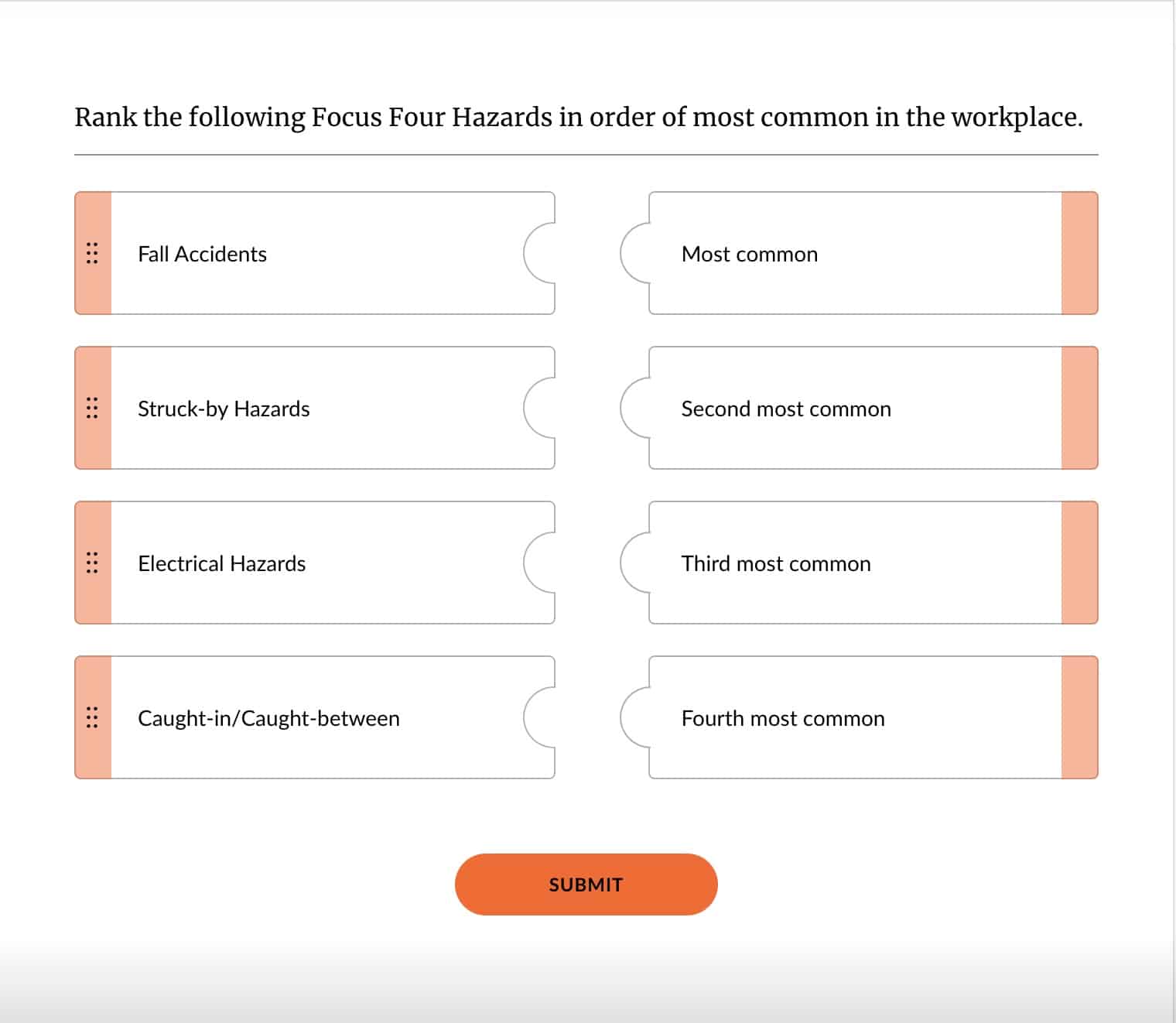
A corresponding quiz question could use a matching format, in which the learner must rank the Focus Four hazards from most common to least common.
 |
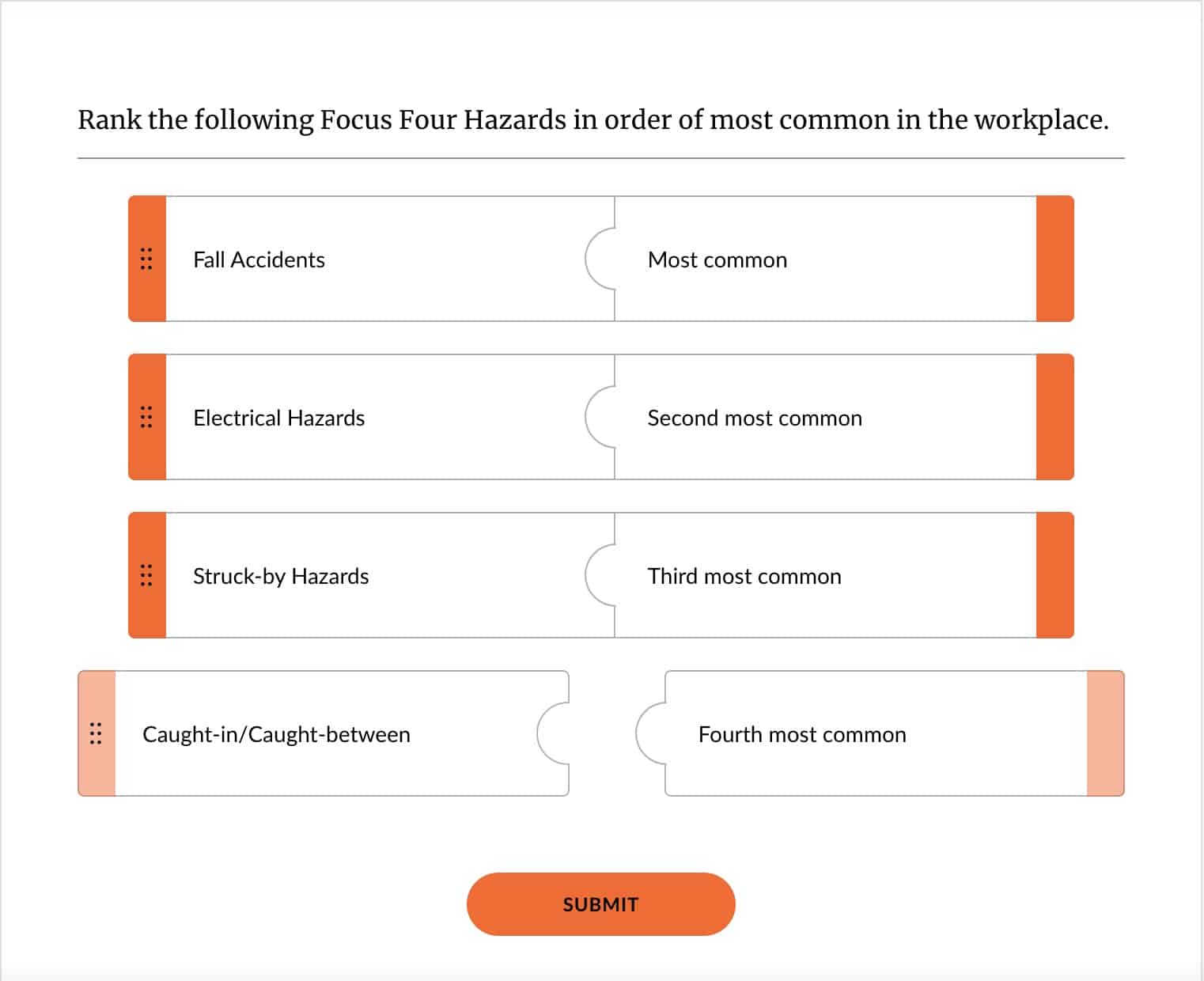 |
This versatile matching/ranking quiz question format is a pre-built block within Rise. Colors, images, and choices and matches can all be customized!
As a follow-up, you could present learners with images of common workplace hazards. They could then choose from a list of prevention methods best suited to the situation.
Your key takeaways: Tie every question to a measurable outcome. Give your learners a chance to prove their knowledge, and connect quiz questions to real-world, applicable knowledge.
2. Write questions that test understanding, not just recall
Effective e-learning questions go beyond asking learners to simply define or identify. Defining key concepts is a great place to start, but moving towards analysis and application is what drives true understanding. To get there, L&D departments use scenario-based learning and application questions. Scenario-based learning gives learners a chance to practice navigating common or difficult workplace situations in a safe, virtual environment.
Take, for example, this sample course for customer service representatives. It includes a scenario-based learning module in which a customer is understandably frustrated and eager to get their power turned back on in the middle of a dinner party. The learner is presented with three similar ways to respond, but only one combines expert skill and empathy—a winning combination.
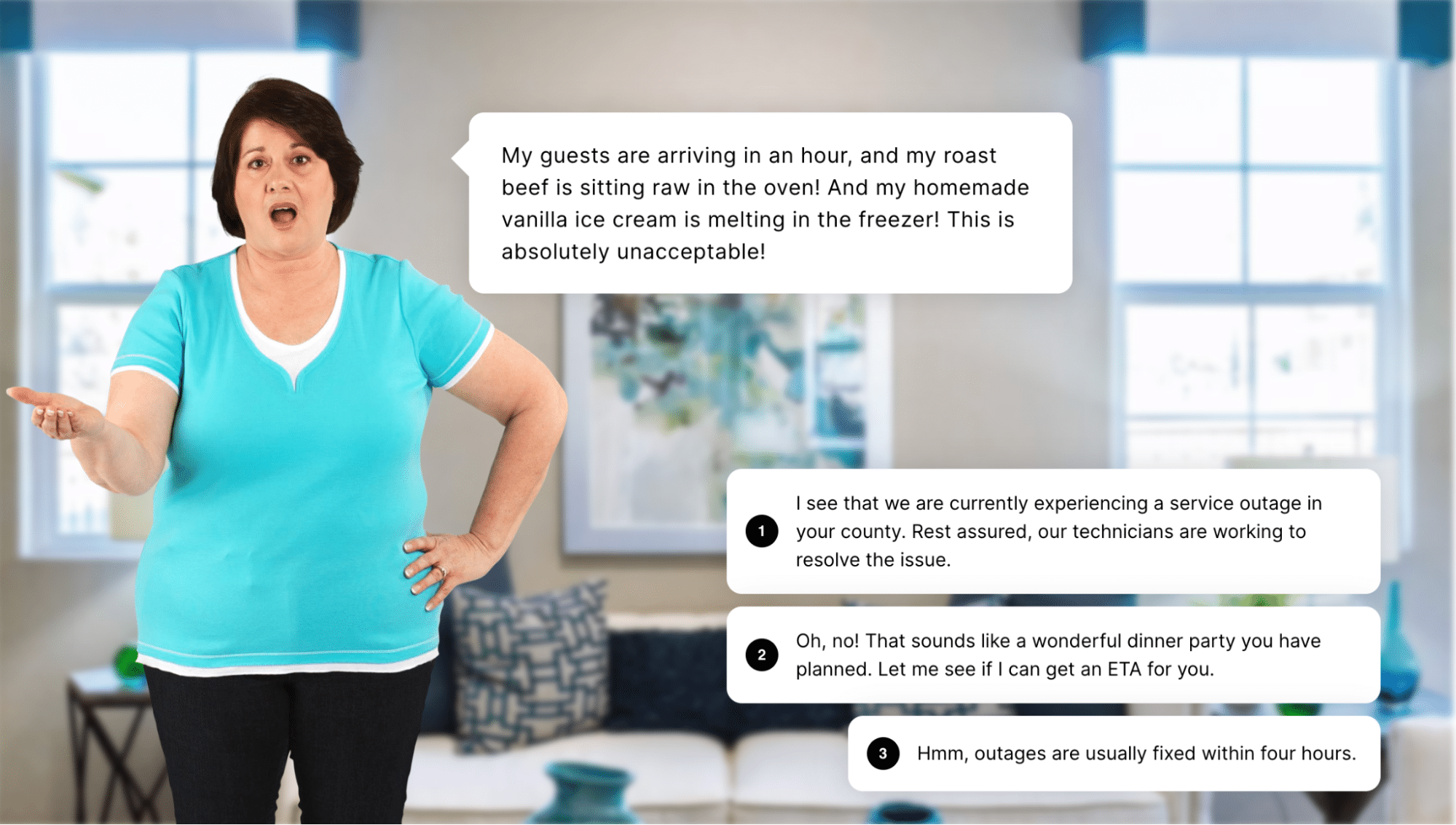
Scenario blocks can be created in mere minutes with Rise. Customize text, characters, backgrounds, and feedback to match your learning objectives!
Choosing option 2 opens a new screen with the same character, but this time the character is calm and smiling, grateful for the compliment and the focused attention on their problem. This could have been a simple recall question that asked the learner to define empathy. Instead, it provides a real-world example of what empathy looks and sounds like.
You can also quickly create a scenario that navigates through simple text questions that mirror a real conversation, like this one between a customer and a support person guiding them through their new applicant tracking system.
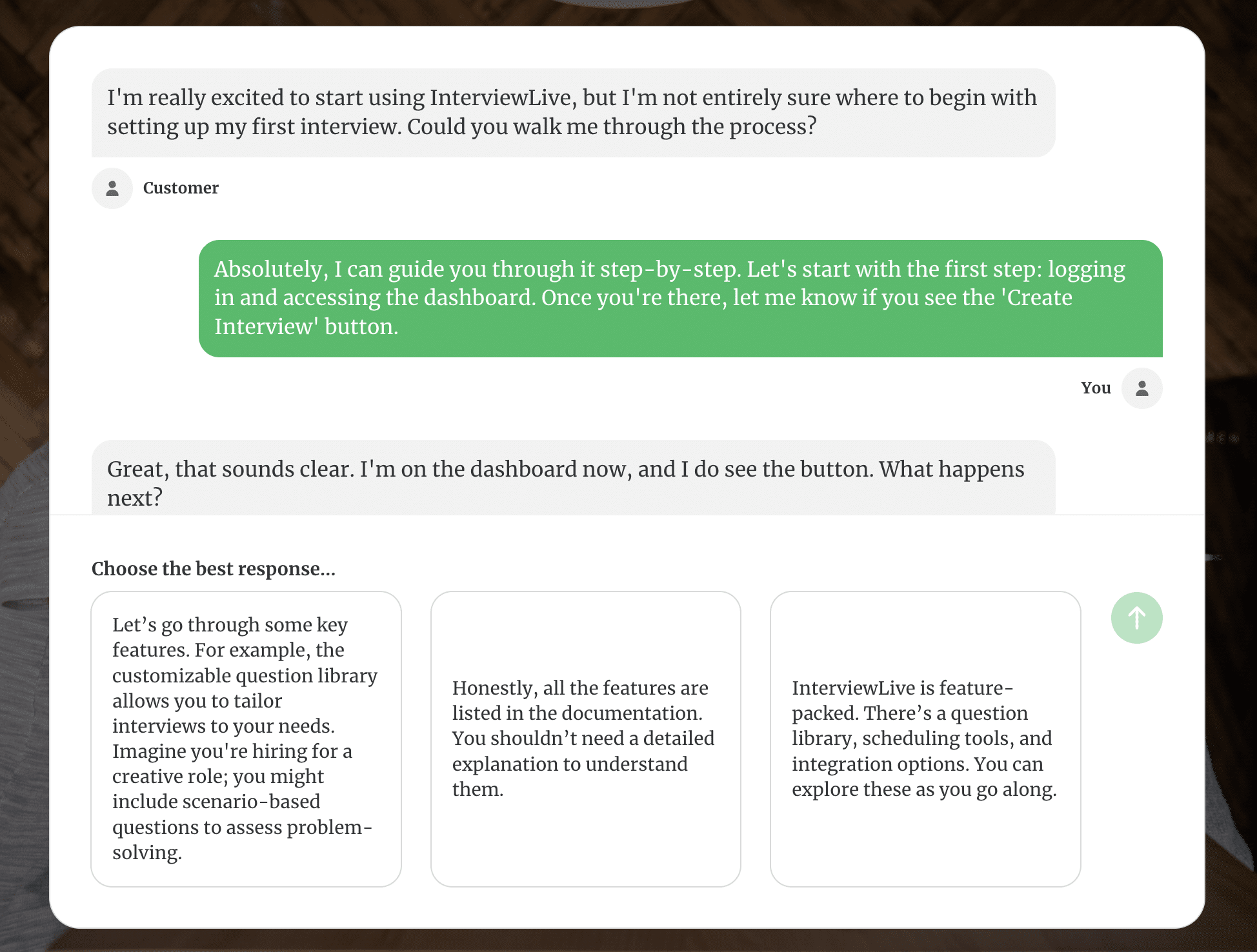
The engaging back-and-forth puts the learner in a first-person perspective, helping them practice the best response before engaging with a real customer.
Your key takeaways: Avoid simple recall questions. Test your learner’s true understanding with relevant, scenario-based questions aligned with their role. To learners, scenarios don’t feel like assessments, but rather chances to test real-world skills in a safe, virtual environment.
3. Craft plausible distractors
You might think it’s a good idea to make the correct answer stand out by sandwiching it between obviously wrong answers, but there’s a downside to that method. Obviously, wrong answers may help learners find the right answer, but at the expense of critical thinking. Take the following question and answer set as an example:
Question: You take a call from a customer who is frustrated about being unable to edit their online cart. How do you respond?
- Tell them to try a competitor’s website instead.
- Scream into the phone until they hang up.
- Say, “I’m sorry you’re experiencing trouble editing your cart. That sounds frustrating! Let’s find a solution for you.”
- Recite the lyrics to “The Wreck of the Edmund Fitzgerald” by Gordon Lightfoot, and then ask them if their problems are really all that bad in comparison.
Sure, your learners will never get this one wrong, but they likely didn’t spend any time thinking about why. It’s best practice to surround the correct answer with plausible distractors—or realistic-sounding incorrect answers. Plausible distractors should also be of similar length and wording to the correct answer to avoid easy giveaways. Learners will have to think about it longer, which increases the likelihood that they’ll retain the correct information.
Your key takeaways: Stay away from obviously wrong answers. Not just a great band name (dibs!), plausible distractors engage learners, increase retention, and promote critical thinking.
4. Provide meaningful feedback
If you’ve ever taken a quiz or test and earned a lower score than you wanted, you likely wanted to know why. That’s natural. Learners want to know what they get wrong and how they can improve. But it’s not just the answers you get wrong that matter. Effective L&D departments provide detailed feedback for all answers—right or wrong.
For example, if your learner incorrectly answered that synchronous learning can only happen in a traditional, in-person classroom environment, your feedback might look like this:
That’s not quite right. Synchronous learning can happen in both in-person and online environments.
If your learner answered correctly, your feedback might look like this:
That’s right! Synchronous learning can happen in both in-person and online environments.
Your key takeaways: Provide meaningful, real-time feedback for answers both right and wrong. Quick reflective learning moments help boost knowledge retention, reinforce key concepts, and motivate learners to keep going.
5. Use variety to maintain engagement
E-learning professionals know that learner engagement is critical to an exceptional learning experience. So, it’s not surprising that effective L&D departments use a variety of e-learning quiz question types to maintain engagement. Consider alternating between multiple choice, matching, drag-and-drop sorting activities, or hotspot questions. Additionally, scenario-based modules engage learners in real-world situations that test their decision-making skills.
Articulate 360 AI includes Storyline and Rise—course creation tools that make it easy to write effective e-learning quiz questions and interactive scenarios. Start your free trial today, and create engaging courses like these in no time!
Your key takeaways: Multiple-choice quiz questions serve a purpose, but there are many other options. Use a variety of quiz formats to engage your learners and get a clearer picture of their understanding.
Designing quizzes for learning, not just grading
Balance challenge and encouragement
You may feel tempted to build e-learning quizzes that are easy enough that almost anyone can pass them. But, engaging learners means finding a balance between challenge and ease. Overly wordy or intentionally tricky questions only frustrate learners. Similarly, incredibly obvious questions might make learners view your content as a waste of time. Questions should be simple to understand, but also challenge the learner to think critically before answering.
Use quizzes as learning checkpoints
Quizzes are not final assessments. If you’ve ever experienced a 50 question “quiz,” you know what I’m getting at. Effective L&D teams use quizzes as snapshots of learner understanding by embedding short assessments throughout the module, rather than ending the module with an enormous test. Bite-sized microassessments reinforce key takeaways from each lesson, and don’t need to be any longer than a few questions. Incrementally positioning assessments ensures that learners better retain what they learned right after they’ve learned it, which makes it easier to recall later.
Challenge learners with well-crafted e-learning quiz questions
To write effective e-learning quiz questions, begin with clear learning objectives, test beyond mere recall, avoid unnecessary distractors, provide meaningful feedback, and use a variety of question formats. Well-crafted quiz questions improve retention, boost engagement, and accurately assess a learner’s understanding. Successful L&D departments meet learner needs by writing quiz questions that balance challenge with simplicity and use checkpoint-based approach.
Want an inside look at smart strategies for efficient e-learning? Watch this on-demand webinar to learn how you can use Rise and Storyline to create engaging, interactive courses. Can’t wait? Get started with your free trial today, and see how easy it is to build engaging, effective quiz questions for any learner.
FAQs for effective e-learning quiz questions
How many questions should an e-learning quiz have?
According to experienced instructional designers, the ideal number of questions for an e-learning quiz ranges anywhere from very few to none! But let’s get a bit more detailed. An e-learning quiz should have only as many questions as it needs to reinforce the intended learning objectives. Our recommendation is 2–5 questions after each lesson. If we’re talking strictly multiple choice questions, keep it to a minimum. Remember, frequent and short quizzes are much better for retention than infrequent, long tests.
What are the most common quiz question types in e-learning?
The most common types of quiz questions in e-learning are multiple choice questions. Other common types include true/false, fill-in-the-blank, and short answer questions. While simple and to the point, these most commonly used quiz question types are also the least engaging. To engage learners further, branch out to more interactive quiz methods like drag-and-drop sorting activities, matching activities, branching scenarios, and hotspot questions.
How can I make quiz questions more interactive?
To make quiz questions more interactive, consider methods like branching scenarios, matching activities, and drag-and-drop sorting activities. What’s most important is how often you have your learners do something—and do it correctly—rather than simply counting how many multiple choice questions they can answer. Align quizzing activities to the original learning objectives, and make it relevant to the learner’s daily workflow. Check out this quick video about how to add knowledge check blocks into a Rise course, and this overview of interactive blocks.
You may also like

What Is a Job Aid? On-Demand Knowledge When Employees Need It Most
Learn how to create a relevant job aid, and discover 5 on-the-go learning formats to deliver precise knowledge exactly when employees need it.

What Is a Community of Practice—and Why Do E-Learning Pros Join Them?
Collective learning builds understanding and insight through shared experiences and open dialogue, benefiting community members and organizations alike.

How to Boost Sales Performance With Hybrid Training
Learn how to train your sales team with a hybrid approach that’s flexible, scalable, and performance-driven.