


Storyline: How to Test AICC Courses in SCORM Cloud
Article Last Updated
This article applies to:
To test AICC courses in SCORM Cloud, make one small change before publishing and another after publishing. Here's how:
1. Modify the Filename(URL) Field
When you're ready to publish your Storyline course, do this:
- Go to the Home tab on the Storyline ribbon, and click Publish.
- Select the LMS tab on the left, and choose AICC as your output option (at the bottom of the window).
- Click Reporting and Tracking.
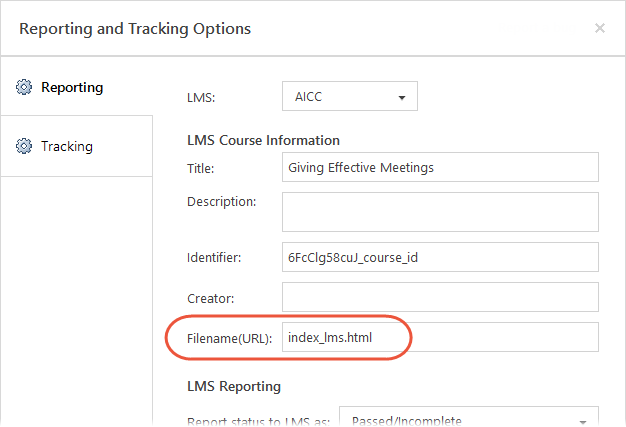
- Change the Filename(URL) field to
index_lms.htmlas shown below, then click OK.
2. Finish Publishing and Modify the Output
Customize the other publishing options as you'd like and complete the publishing process. When the Publish Successful dialog appears, do this:
- Click Open to see the published files.
- Open the
lmsfolder. - You'll see either a
scormdriver.jsfile or aConfiguration.jsfile, depending on the authoring app you used and the publishing format you chose. Open the file in a text editor, such as Notepad. - Find this line of text:
var REVIEW_MODE_IS_READ_ONLY = true; - And change it to:
var REVIEW_MODE_IS_READ_ONLY = false; - Save and close the file.
3. Upload the Published Output to SCORM Cloud
Zip your modified published output. (If the Publish Successful dialog is still open, just click the Zip button.) Then upload the zip file to SCORM Cloud for testing.