







This is a good reminder to focus on the business. I need to think through the strategy, though.
Earlier we looked at understanding the customer’s perspective, and how to jump start your next project. Today, we’ll look at some key considerations when building your e-learning courses.
When building your e-learning it’s important to understand what type of course you are developing. This helps you make the right decisions about what to do and how to use your resources. Not all e-learning is created equal. There are different types of e-learning courses. Some are information-based and some are performance-based.
- Information-based courses are typically driven by regulations or compliance needs. It’s mostly content that is explained.
- Performance-based courses are focused on changes in behavior and real, measurable improvements.
E-Learning Design: Bring Value to Your Organization
You are a steward of your organization’s e-learning resources. It’s important to make the decisions that positively impact the bottom line. A first priority is to make sure that the e-learning courses you build are aligned to the organization’s performance goals. Generally, you’ll always be aligned if you are focused on cost and time improvements. But ultimately, you want to focus on specific performance improvements.
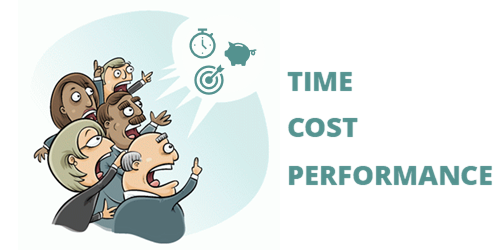
Three ways that you can bring value to your organization:
- Cost: Focus on managing the cost of projects and development time. You can also focus on the value you bring in comparison to outsourcing.
- Time: How fast can you deliver the training? Time is money.
- Performance: Increased performance has a direct impact on the bottom line.
E-Learning Design: Help Your Customers Find the Right Solution
Many times your customers determine that an e-learning course is the right solution to meet their goals. Before investing the organization’s resources in e-learning courses, it’s important to understand if the customer’s assumptions are correct and an e-learning course is the right solution.
Ask good questions and identify clear objectives.
You serve your customers, the organization, and yourself when you help identify the best solution to their goals. There are times when training isn’t the way to get the results the customer really wants. In this case, it’s possible to save the organization money if you can help them see that an e-learning course is not the right solution. You might not get the work, but you’ll be seen as a valuable contributor.
E-Learning Design: Determine What Type of Training Course You Need to Create
When you develop e-learning courses, you have two options. You can use a rapid e-learning tool like the ones in Articulate 360 or you can pay for custom development. Because of this, it’s important to have a process in place to determine when to go with in-house resources and when to go with custom development.
If you do outsource, it’s a good idea to dictate that you want the course developed in an authoring tool like Storyline and then request the source files. This will save you money when you need to make tweaks and edits. You can do them yourself.
Many e-learning courses have no real performance goals tied to them. Their purpose is to convey information or comply with regulations. This doesn’t mean that the information’s not important. It just means the purpose of the course is to disseminate the information, and not necessarily see a performance improvement.
Authoring tools like Rise 360 are perfect for these types of e-learning courses. You can build them quickly. They look great and work on mobile devices. And you meet your customer’s goals with minimal investment. Personally, my default position is that we use the easiest authoring tools unless we can justify spending more time and money building something more complex.
Let me explain.
The rapid e-learning tools are more than adequate to handle most e-learning needs. Why not go with what costs less and is easy to implement? Unless you need custom interactions or more complex design, the easier, the better.
Custom development can be costly. The only way I would go past the rapid e-learning tool set is if the project requires more complex interactivity tied to performance expectations. My belief is that if the customer cannot show a clear link to performance improvements, then it is my responsibility to meet their training needs with minimal cost and time commitment.
This doesn’t mean that the projects are subpar, it just means that I don’t commit expensive resources to a project that doesn’t show a return on investment. Courses that show a clear connection to changes in performance are the ones to which you want to commit the bulk of your resources.
Rapid e-learning tools can help you build most of what you see in the e-learning industry. Development costs are low, the tools are easy to learn, and you can deliver a quality project rapidly.
Whichever approach you take, it’s important to think through the objectives of your e-learning course. There’s a time to use a rapid e-learning tool and there’s a time to commit more resources to custom work. Develop a process to determine when that is. You’ll be able to help your customers get a quality product with the right investment.
Next in the series, we’ll learn to build a simple project plan.
Events
- Everyday. Check out the weekly training webinars to learn more about Rise, Storyline, and instructional design.
Free E-Learning Resources
 |
 |
 |
|
Want to learn more? Check out these articles and free resources in the community. |
Here’s a great job board for e-learning, instructional design, and training jobs |
Participate in the weekly e-learning challenges to sharpen your skills |
 |
 |
 |
|
Get your free PowerPoint templates and free graphics & stock images. |
Lots of cool e-learning examples to check out and find inspiration. |
Getting Started? This e-learning 101 series and the free e-books will help. |

8 responses to “What Everyone Ought to Know About Designing an E-learning Course”
We have found a surprising improvement in agreement on content and structure by using the storyboard method for showing content and sequence and interactions to clients during development and getting signoff before the final version is coded and published.
For projects developed externally by contractors in Articulate or Flash, we have found cost reductions of 50% to 75% if we go to them with a storyboard and content files for graphics, audio and video.
Storyboards to not have to be complicated, they can be made simply in PowerPoint or any other presentation tool.
Art, can you direct me to an info sheet or two on making storyboards with powerpoint. How do you do it so that it’s less than a finished presentation? You don’t put graphics, audio, and video on the slides but keep them in content files? Thanks.
I have make powerpoint that look like a modles and the sound is my problem. I cant get in the time to fix in the slide.I use the powerpoint in my class to clarify concept in a visual way.It more easy for the student to see thing that to talk about it . The clip art are the one that I have to look for and this take a lot of time.So I beging by collecting all I can of the different concept and put them in a folder.it like you write here a person have to go step by step and organize the tools that you are going to work with.
To plan my lesson in art where there are a lot of concept I have to get all the tools i need and get more if I can to make the lesson more interesting. Thank you very much for all the help that you have giving me.
Learning objectives! Why? Because we need to answer questions like: How does this product align with other training courses? Is there an overlap? Does this fit into a curriculum of blended solutions? I know folks can get wrapped around the axle when they start writing objectives. But, objectives are the framework for good design. We’re seeing this over and over among the contract staff we’ve engaged on projects.
[…] What Everyone Ought to Know About Designing an E-learning Course […]
Tom,
As a teacher just getting into instructional design, I’m comfortable starting with objectives and specific goals, but determining what type of deployment seems like it only comes with experience. Besides committing resources more generously to performance and bottom line projects, do you have any more general rules of thumb for this?


0
comments